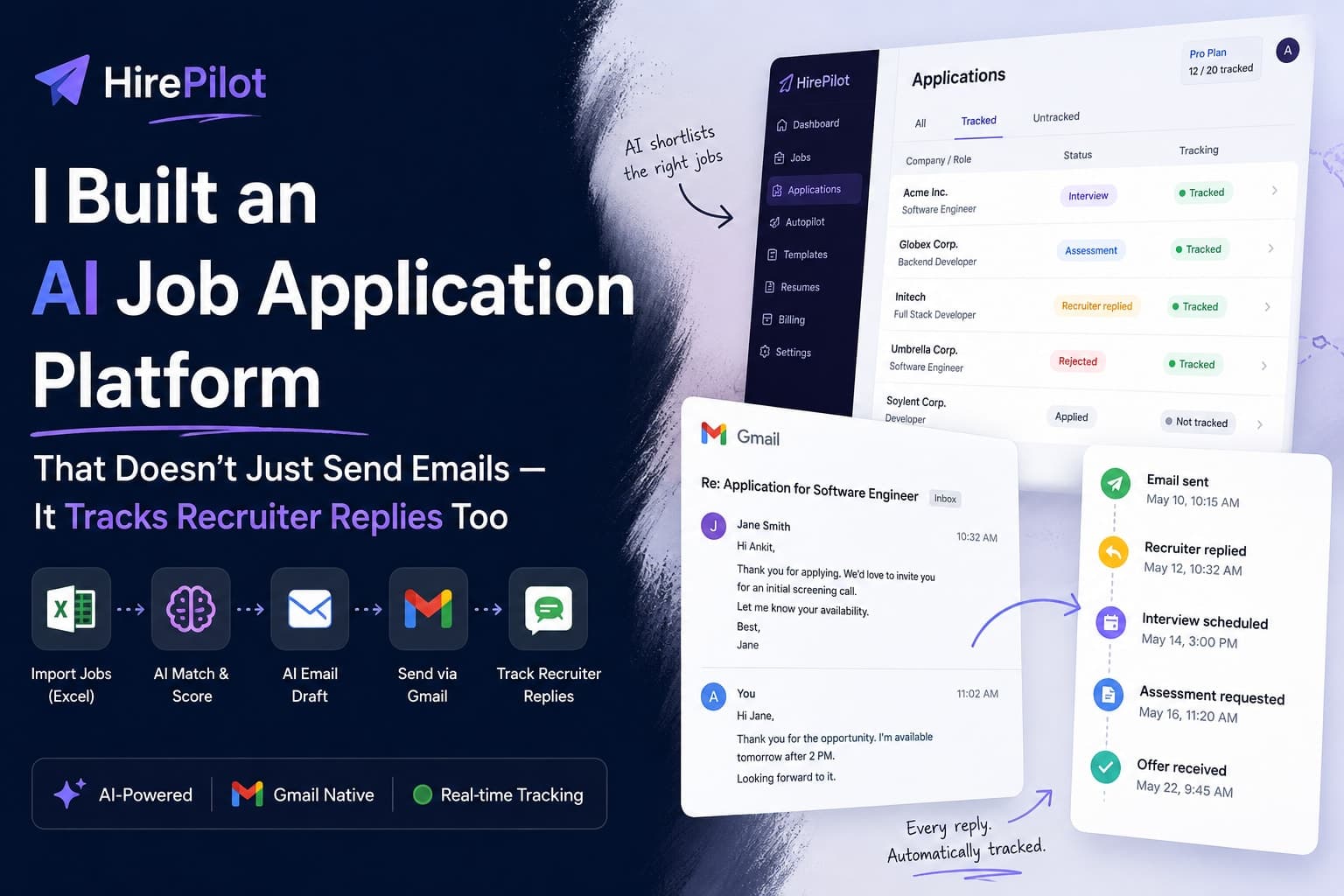
I Built an AI Job Application Platform That Doesn't Just Send Emails — It Tracks Recruiter Replies Too
Introduction
There is a very specific kind of frustration that builds up when you are applying to jobs at scale.
It starts with a spreadsheet. Maybe you collected 80 companies from LinkedIn, job boards, or a curated list someone posted online. Each row has a company name, a role title, sometimes a recruiter name and an email address, occasionally a job description link. You feel organized. You feel ready.
Then you start applying. You draft an email for the first company. You change the company name for the second. You forget to change it for the third. You send the same slightly-generic email to forty companies and feel vaguely bad about it. Three days later a recruiter replies and you spend ten minutes scrolling through your sent folder trying to figure out what you even said to them.
Two weeks pass. You have sent sixty-something emails. You have no idea which ones bounced, which ones got a reply, which ones are waiting, and which ones you accidentally sent to the wrong person.
I kept running into this. Not just the inefficiency of the process, but the feeling that the work I was putting in was disappearing into a black hole. There was no feedback loop. There was no way to know what was happening after you hit send.
That frustration is what eventually became HirePilot.
HirePilot is a SaaS platform that takes a job list in Excel, runs AI matching against your profile and resume, drafts personalized emails, sends them via Gmail, and then watches your inbox for recruiter replies and updates a live timeline for each application. The whole thing is designed around one core idea: automate the busywork, but keep the human in control of what actually goes out.
This blog is about what it took to build that. The architecture, the decisions, the edge cases, and the parts that were harder than expected.
The Problem
Job applications fragment across too many places.
The job list lives in a spreadsheet. The emails live in Gmail. The tracking lives in a Notion table or a sticky note or nowhere at all. When a recruiter replies, you need to go find the original application, remember what you said, figure out where you are in the process, and respond appropriately. If you are applying to twenty companies that is manageable. If you are applying to a hundred it becomes chaos.
The deeper problem is that sending the email is not the end of the job. It is the beginning of a conversation. But nothing in the typical job seeker's workflow treats it that way. You send an email and then that application disappears from your awareness until something forces it back, usually because a recruiter replied and you have to scramble to remember context.
I also noticed a second problem. The effort of personalizing each application is real. You cannot just blast the same email to everyone. But personalizing sixty emails manually is not realistic either. So most people settle somewhere in the middle. They semi-personalize, they rush, they make mistakes. The application quality degrades as volume increases.
The solution to both problems is the same: you need a system that handles the mechanical parts so you can focus on the parts that actually require judgment.
Existing Alternatives and Their Limitations
Before I started building anything I looked at what already existed.
Job boards like LinkedIn, Indeed, and Glassdoor let you apply with one click in some cases, but they are closed ecosystems. You cannot bring your own job list. You cannot use your own email. You have no visibility into what happens after you apply.
Resume builders solve a specific formatting problem but nothing else. They stop at the document.
Applicant tracking tools like Huntr or Teal let you organize applications manually. They are basically Kanban boards with some fields for company and role. They require manual data entry and they do not help you actually send anything.
Email tools like Mailchimp or Lemlist are built for sales outreach, not job applications. They handle bulk sending but they are not designed around individual application context, resume relevance, or recruiter conversation tracking.
What I kept finding was that each tool solves exactly one piece of the problem. You still have to manually connect the dots between them. There is no single system that takes you from "here is a spreadsheet of companies" to "here is the current status of every conversation I have going with recruiters."
That gap is what I tried to fill.
The Core Idea Behind HirePilot
The philosophy I kept coming back to while designing this was: automate the busywork, not the judgment.
I did not want to build something that spray-sends emails to every company in your spreadsheet without any review. That approach is not good for the applicant and it is not good for the recruiters receiving those emails. The goal was to remove the mechanical repetition while keeping humans in the loop for the actual decisions.
That translated into a few concrete design choices:
Excel-first ingest. The spreadsheet is where job seekers actually collect roles. I did not want to force people into a different format. I wanted to meet them where the data already lives.
AI matching. Before anything gets sent, each job gets scored against your profile, your skills, your resume, your preferred roles and technologies. The system forms a view on how good a fit this is. You can see the reasoning.
Human-controlled sends. Autopilot can queue strong matches automatically, but you always have the ability to approve borderline fits, skip weak matches, or override any decision. Manual apply is always available and is never subject to automation quotas.
Gmail-native sending. Not SMTP, not a marketing email platform. Gmail, so that your sent emails live in your actual inbox and conversations stay continuous.
Reply tracking. Once an email is sent, the system keeps watching that Gmail thread. When a recruiter replies, it updates a timeline on that application automatically.
The combination of these things is what makes HirePilot different from just "a tool that sends emails." The tracking piece is where most of the interesting engineering lives.
The End-to-End Flow
Here is how data moves through the system from upload to timeline update:
Excel (.xlsx / .xls)
        |
        v
    Upload
        |
        v
    Parse
    (jobs found, duplicates skipped, invalid rows flagged, blocked companies excluded)
        |
        v
    Match Pipeline
    (AI score + deterministic fallback, per job)
        |
        v
    Autopilot Decision
    (auto_apply / ready_to_apply / skip / reject)
        |
        v
   [Autopilot ON]              [Autopilot OFF]
   Score >= threshold?          Strong fits -> ReadyToApply
   Quota available?             User approves manually
        |
        v
    Queued
        |
        v
    Generating
    (AI draft email)
        |
        v
    Sending
    (Gmail API preferred, Resend fallback)
        |
        v
    Applied
    (Gmail threadId stored)
        |
        v
    Gmail Watch + Cloud Pub/Sub
    (push notification on inbox change)
        |
        v
    History API
    (incremental sync of changed messages)
        |
        v
    Classify Reply
    (Interview / Assessment / Offer / Rejected / etc.)
        |
        v
    Timeline Update
    (append-only event log per application)
Every stage after "Sending" is asynchronous. The user does not wait for any of it. They can come back later and see the timeline updated.
Parsing Real-World Job Lists
The first thing that surprised me about building this was how messy real spreadsheet data is.
In theory, a job list has a company name, a role, a recruiter name, and an email address. In practice, every spreadsheet is different. Some have phone numbers, some have LinkedIn URLs instead of emails, some have the recruiter's name in the same cell as the company name, some have rows with missing contact information entirely.
I had to make firm decisions about what constitutes a valid job row. If there is no contact information, the row cannot be applied to, so it gets flagged as invalid but still stored for reference. If the same company and role appear twice in the same upload, it is a duplicate and gets skipped at parse time. Importantly, duplicate rows still count toward the daily import quota even though they do not create new jobs. That is a deliberate product rule: you used the platform's parsing capacity regardless of what the data looked like.
Blocked companies add another layer. Users can maintain a list of employers they never want to apply to. When a blocked company appears in a parse, it does not get stored at all. You cannot accidentally apply to a company you have explicitly excluded.
The parse summary shows exactly what happened: how many rows were found, how many were stored, how many were duplicates, how many were invalid, how many were blocked. Transparency there matters because people trust the system more when they can see what it did with their data.
One thing I underestimated initially was the JD extraction problem. Job descriptions come in as raw text or URLs. Parsing the actual content out of a URL reliably is non-trivial, especially with modern SPAs where the job description might be rendered client-side. I ended up building a fallback path for when JD extraction partially fails, so the match engine still has something to work with even if the description is incomplete.
Building the Matching Engine
The matching engine is what decides how good a fit a given job is for a given user.
The inputs are the parsed job (company, role, JD, required skills) and the user's profile (experience, skills, preferred roles, preferred technologies, active resume). The output is a score, a decision band, and optionally an explanation.
I built this with two layers. The primary layer uses AI scoring, which does a proper semantic analysis of the job description against the resume and profile. The fallback layer uses deterministic rules, basically keyword matching and overlap calculation. The system notes which one was used in the matchSource field so you can see after the fact whether AI or rules made the call.
The reason for two layers is reliability. AI calls can fail or be slow. For a batch matching job that might process fifty rows after an upload, you cannot have the whole pipeline stall because one API call timed out. The rules fallback ensures you always get an answer.
The decision bands came out of a question I kept asking: what is the right action to take with this match score?
There are four bands:
Decision Meaning auto_apply Strong fit, Autopilot can queue this ready_to_apply Good fit, needs user approval skip Weak fit, shown in skipped list reject Not a fit at all
The distinction between auto_apply and ready_to_apply is important because it maps to two different user experiences. Auto-apply means the system does the work without bothering you. Ready-to-apply means the system surfaces a recommendation but waits for your go-ahead. Users control the threshold for this split in settings.
I also had to decide what happens when Autopilot wants to auto-apply but has exhausted the daily quota. The answer was to hold those applications as ReadyToApply with an internal plan_limit decision code. They do not get lost. They just wait for the user to manually approve them or for the next day's quota to reset. This felt better than silently skipping them, because you still want to know about strong fits even if you cannot auto-send right now.
Gmail-Native Sending
Early on I had to decide between SMTP, a transactional email service like Resend, and the Gmail API directly.
SMTP and Resend are simpler to set up. You get an API key, you call an endpoint, you move on. But they have a significant problem for this use case: the sent emails do not live in the user's Gmail inbox. They come from a domain the user does not own, or from a different address, and there is no Gmail thread to track.
The whole reply tracking feature depends on having a Gmail threadId tied to each sent email. Without that, you cannot watch the conversation. So Gmail API became the required path for tracking, and Resend became the fallback for when users have not connected Gmail yet.
The practical consequence is that the first thing onboarding pushes you toward is connecting Gmail. When you do, you need to grant two scopes: send permission and gmail.readonly. The readonly scope is what enables reply tracking. Some users are cautious about granting read access to their inbox, which is understandable. The platform makes clear that it only reads threads tied to tracked applications, not the whole mailbox.
One edge case that required explicit handling: if a user connects Gmail but only grants send permission (not readonly), they can still apply, but reply tracking is unavailable for those applications. If they later reconnect and grant both scopes, existing sent applications can be enrolled retroactively via catch-up, but only if a Gmail threadId was recorded at send time.
The Hardest Feature: Recruiter Reply Tracking
This is the part of the project that took the longest to get right.
The naive approach to tracking recruiter replies is polling. Every few minutes, check each tracked application's Gmail thread and see if there is anything new. This is simple to implement and immediately becomes a problem at any kind of scale. If you have a hundred tracked applications and you poll every two minutes, you are making three thousand Gmail API calls per hour, hitting rate limits, burning resources, and still missing messages that arrive between polls.
The right architecture for this is push-based.
Gmail has a Watch API. When you call it on an account, Gmail starts publishing notifications to a Google Cloud Pub/Sub topic whenever that mailbox changes. The notification is minimal: it tells you which Gmail account had an activity, and it gives you a historyId for where the mailbox state is now.
Gmail Watch
      |
      v
Cloud Pub/Sub
      |
      v
Webhook (server receives push)
      |
      v
History API (fetch changes since last known historyId)
      |
      v
Changed Threads Only
      |
      v
Filter to Tracked Applications
      |
      v
Classify Message
      |
      v
Timeline Update
The History API is the key piece. Instead of fetching every thread from scratch, you call users.history.list with the historyId from your last sync and it returns only what changed since then. You store the historyId after every sync and use it as the starting point for the next one.
This means you are processing deltas, not full mailbox scans. The amount of work per notification is proportional to how much actually changed, not to how many applications you have tracked. That scales correctly.
The threadId mapping is what connects a Gmail message to a HirePilot application. When an email is sent via the Gmail API, the response includes the threadId that message belongs to. You store that threadId on the application record. When a change notification comes in, you fetch the changed threads, filter to the ones you have stored, and process only those.
One subtlety here: Gmail notifications are not always fired once per message. Sometimes they come in batches, sometimes they come slightly delayed, sometimes the same notification fires more than once. The sync logic has to be idempotent. Processing the same Gmail message ID twice should produce the same result as processing it once, not duplicate timeline entries.
Each timeline entry is keyed by Gmail message ID. If a message has already been processed, a re-evaluation updates the existing entry rather than appending a new one.
The Watch registration itself has a limitation: it expires after seven days. There is a background job that renews watches before they expire. If a watch lapses for whatever reason, the system detects the gap on next activity and can do a catch-up sync from the last known historyId.
Designing Premium Tracking
The tracking feature raised an interesting product design question: how do you price a feature that is fundamentally about ongoing conversations?
The obvious approach is to charge per reply. You get ten recruiter replies included per month, extra ones cost credits. I rejected this pretty quickly. It creates bad incentives. Users would feel penalized for getting more recruiter interest. The more successful the tool is at its job, the more it costs you. That is not a good relationship to create.
The model I landed on is: you pay for enrollment, not for replies. When a new application is created and enrolled for tracking, that uses one monthly slot. Everything that happens inside that conversation afterward, every reply, every follow-up, every interview update, costs nothing. Conversations can run indefinitely.
Plan Monthly Tracking Slots Autopilot / day Job Imports / day Free 0 10 50 Pro 20 50 200 Pro Plus 50 200 500 Admin (role) Unlimited Unlimited Unlimited
The distinction between role and plan is important here. Admin is a permission level, not a subscription tier. An admin user gets unlimited everything regardless of what plan is stored against their account. A regular user is strictly constrained by their plan entitlements.
There are two operations that explicitly do not consume tracking slots:
Catch-up: If you had been applying manually before you connected HirePilot's tracking, you might have existing Gmail threads with recruiter conversations already in progress. Catch-up lets you enroll those retrospectively and sync their full history. It does not use monthly slots because you are not tracking new activity, you are importing existing history.
Re-evaluate: If the AI classification of a reply changes, or if you want fresher recruiter notes on an already-tracked thread, re-evaluate refreshes the analysis without creating a new enrollment. No quota consumed.
The rationale for catch-up not consuming slots is fairness. You should not be penalized for enrolling conversations that were already happening before you turned on tracking.
Background Workers Everywhere
The architecture of HirePilot is built around asynchronous processing. Almost nothing in the core user-facing flows happens synchronously.
When you upload a spreadsheet, the file is accepted immediately and processing starts in a background worker. The worker parses rows, checks for duplicates and blocked companies, stores valid jobs, and then kicks off the match pipeline. The match pipeline processes jobs one at a time, calling the AI scorer or falling back to deterministic rules, and emits Autopilot decisions as it goes.
When an application moves to the send stage, another worker handles email generation and sending. Gmail API calls can be slow. You do not want the user waiting on a network call that might take several seconds.
Gmail sync runs in its own worker, triggered by incoming Pub/Sub notifications. Classification of recruiter replies is an AI call, which again goes through a worker to keep the main request handling clean.
The practical consequence of this is that the UI is mostly showing you the current state of things that are being processed elsewhere. Progress indicators, status polling, timeline updates, these are all reflecting work that is happening asynchronously. The client polls application detail on an interval when it detects something is in-flight. There are no websockets in the first version. Polling every thirty to sixty seconds for a job application tool is perfectly acceptable, and it keeps the operations footprint simpler.
The tradeoff is that some things feel slightly delayed compared to what a fully real-time system would produce. A recruiter reply might take a minute or two to show up on the timeline after it arrives in Gmail. For the use case, that is fine.
Technical Challenges
Idempotency
Apply, approve, and reapply all use idempotency keys. If a network failure causes a client to retry a request, the server should recognize the key and return the same result without creating a duplicate application or sending a second email.
This required careful database design. Each application creation is keyed on a combination of user, job, and a client-generated idempotency token. A second request with the same key within the idempotency window returns the existing application record rather than creating a new one.
The same principle applies in the email sending layer. If a send worker crashes after submitting to Gmail but before recording the threadId, the retry needs to detect that the message was already sent rather than sending again. Gmail's message deduplication headers handle part of this, but you also need application-level state tracking.
Thread Mapping
Every application that uses Gmail sending stores the Gmail threadId returned in the send response. This is the anchor for all downstream tracking.
The mapping needs to survive application state changes. If an application goes from Applied to RecruiterReplied to Interview, the threadId does not change. The whole conversation is one thread. Every sync operation uses the same thread ID throughout the application lifecycle.
One edge case: if a user sends a follow-up from their actual Gmail client (outside HirePilot), the thread might branch in unexpected ways. The system reads all messages in the tracked thread and classifies the most recent recruiter reply regardless of thread branching.
Incremental State
Every Gmail account being watched has a lastHistoryId stored in the database. This is the cursor for incremental sync.
The challenge is keeping this cursor accurate. If a sync fails halfway through, the cursor should not advance. If a sync succeeds but only partially processes messages, the cursor should not advance. The cursor only moves forward after a fully successful sync.
This means sync operations are structured as: fetch changes, process all changes, commit cursor. Never update the cursor incrementally mid-batch.
If a watch lapses and there is a gap between the last known historyId and the current mailbox state that Gmail can no longer fulfill (Gmail's History API only retains history for a limited window), the system falls back to a full thread fetch for all tracked applications for that account.
Status Detection
Classifying recruiter replies is not a solved problem. The same email from a recruiter might be an interview invitation, an assessment request, a request for more information, or a rejection. The language is often ambiguous.
I built the classifier as a prompt to the AI model with the email thread context. It returns a structured classification: one of RecruiterReplied, Assessment, FollowUp, NeedMoreInformation, UnknownReply, Interview, Offer, Rejected, or Accepted.
The classification has a deliberate conservatism built in. Status upgrades are more permissive than downgrades. An application at Offer does not downgrade to Interview if an assessment email arrives. Once you reach Accepted or Rejected, the status is frozen. This prevents the timeline from going backward when message classification is uncertain.
UnknownReply is a real state, not an error. It means a reply arrived that the classifier could not confidently categorize. The timeline records the event, the user can read the note and make their own judgment.
Concurrency
The background worker architecture creates a number of concurrency concerns.
The match pipeline, the send pipeline, and the Gmail sync worker all operate on the same application records. They need to handle cases where multiple workers might try to update the same record. I used database-level locking and status-based guards to prevent most of the problematic overlaps.
For example: a send worker only picks up applications in Queued status and immediately moves them to Generating before doing any work. This transition serves as a soft lock. A second worker will not pick up the same application because it is no longer in Queued.
Similarly, Gmail sync operations are serialized per account rather than per application. You process all changes for an account in a single sync run to avoid interleaving problems between the cursor state and the change processing.
Building Admin Operations
Internal tooling is often treated as an afterthought. I tried not to do that here.
Admins have a set of capabilities that are genuinely necessary for running a platform:
Plan management. Assigning a plan to a user, viewing their current usage, and maintaining a history of plan changes. Plan assignment does not reset current-period usage counters, which is an important rule: if someone was on Free and you upgrade them to Pro mid-day, they keep any Autopilot runs they already used today and just get access to the higher limit going forward.
Tracking diagnostics. The tracking feature has a lot of moving parts. Gmail Watch status, Pub/Sub health, sync states across accounts, failed or paused syncs. Admin has dashboards for all of this plus the ability to force-sync a specific account or application.
System metrics. Process health, disk usage, upload file management. Orphaned uploaded files can be identified and cleaned up without touching application data.
Logs. Durable activity logs and real-time file tailing for debugging. When something goes wrong in the send or sync pipeline, being able to see the log tail directly in the admin UI saves a lot of time.
The guiding principle for admin tooling was: make it possible to diagnose and recover from any failure state without touching the database directly. The platform should be operable through its own UI.
When NOT to Build It This Way
There are some real limitations to this architecture that are worth being honest about.
Resend-only emails cannot be tracked. If a user sends via Resend (because they have not connected Gmail), there is no Gmail thread to watch. Those applications will never appear in tracking. This is a fundamental constraint of the architecture. Tracking is only possible because Gmail sends create threads in the user's actual mailbox.
Non-Gmail inboxes are not supported. The tracking feature is entirely Gmail-specific. Outlook users, people with custom mail servers, or people who use their company email for applying are out of scope for reply tracking.
Over-automation is a real risk. Autopilot is deliberately quota-gated. If it were unlimited, users would be tempted to just turn it all the way up and let it send hundreds of applications without any curation. That would likely produce worse outcomes, not better. The quotas encourage thoughtful use even at the Pro Plus level.
AI classification can be wrong. The reply classifier makes mistakes. Sometimes a rejection looks like a follow-up. Sometimes an assessment invitation looks like an interview. The UnknownReply state exists precisely because confident misclassification is worse than honest uncertainty.
What This Project Taught Me
Building HirePilot reinforced a few things I had partially understood but now feel more concretely.
Async thinking is a discipline. It is easy to design features as if they happen instantly and then retrofit async handling. It is much better to start with the assumption that everything important takes time and design the state machine accordingly. HirePilot's application lifecycle is a state machine. Understanding it as such made the implementation cleaner.
Push beats pull at scale. The Gmail Watch architecture was more work to set up than polling would have been. It is also the right answer. Incremental synchronization of deltas is how you build something that can scale without becoming expensive.
Idempotency is non-negotiable. In a system with multiple background workers, network failures, and retries, non-idempotent operations will eventually cause duplicates. Building idempotency in from the start is much less painful than adding it later.
Quotas are product design, not just billing. The decision about what counts toward which quota and what does not is a product decision with real user experience consequences. Getting it wrong creates friction in unexpected places. Getting it right makes the product feel fair even when limits exist.
Internal tooling pays for itself. The admin platform took meaningful time to build. Every time something has gone wrong in production, it has paid back that investment by making diagnosis fast.
Final Thoughts
The thing I keep coming back to when I think about this project is that reliable automation is mostly about handling edge cases.
Sending an email is easy. Sending the right email to the right person with the right content at the right time while respecting quotas, checking for blocked companies, falling back gracefully when Gmail is not configured, and storing enough metadata to track what happens next is where all the actual work lives.
Reply tracking sounds like a simple feature: watch for replies, update a status. The implementation involves Gmail's Watch API, Cloud Pub/Sub, incremental history sync, cursor management, idempotent message processing, AI classification, and status transition rules. Each of those pieces is manageable on its own. Connecting them reliably is the engineering challenge.
I am genuinely happy with where the project ended up. It solves a real problem in a way that respects the user's autonomy. You can try it at hirepilot-fe.vercel.app.
What I'd Build Next
A few things I have been thinking about:
Recruiter analytics. Which companies tend to reply fastest? Which role types get the most responses? This data exists in the timeline and could be surfaced as insights.
Follow-up suggestions. If an application has been in Applied status for two weeks with no reply, the system could proactively suggest a follow-up email and offer to draft one.
Interview dashboard. When applications start reaching Interview status, the needs change. You want prep materials, company research, scheduling information. A dedicated view for in-progress interviews would be useful.
Browser extension. Right now job ingestion requires an Excel file. A browser extension that lets you add a job from any job posting page directly into HirePilot would remove a significant step from the workflow.
Calendar integration. When an interview is scheduled, the confirmation email usually has date and time information in it. Parsing that and offering to add it to your calendar is a natural next step.
Closing
This was a genuinely interesting project to build. It sits at the intersection of distributed systems, event-driven architecture, AI integration, and a problem space I understand from personal experience.
If you are building something in a similar space, or if you have thoughts on the approach I took here, I would be glad to hear it. There are real tradeoffs in the design decisions I made and I do not think I got all of them perfectly right. The architecture for Gmail sync in particular has several points where I made pragmatic choices that a larger team might handle differently.
Happy to go deeper on any of the technical pieces in the comments.